myRSync: Android GUI for rsync-based scheduled mobile backups and mirroring
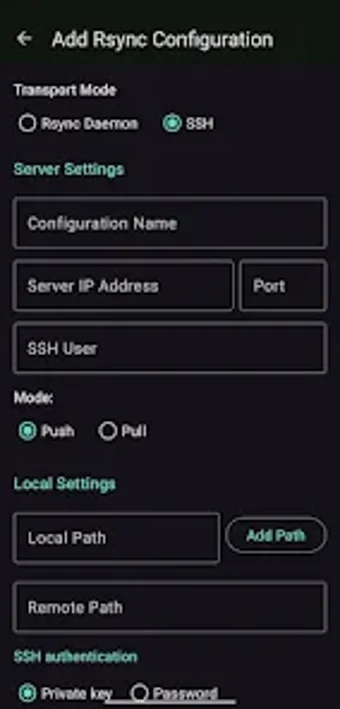
Experience myRSync, by Socrates Chouridis, a mobile rsync front end for Android backups and remote mirroring. The app creates, runs, and schedules rsync commands via a graphical interface, enabling delta-based transfers and command customization for targeted directory synchronization with remote rsync daemons. It exposes profile management, a schedulers dashboard, detailed rsync logs, and support for custom arguments to debug and automate tasks. Advanced Android users, IT professionals, and Linux enthusiasts gain direct control over mobile-to-server backups and bandwidth-efficient mirroring.
myRSync maps rsync functionality to Android storage and networks
The app acts as a graphical front end for the rsync tool, letting users mirror local Android directories to remote servers and connect to rsync daemons. It implements delta-transfer semantics so only changed file data is sent, which reduces network usage during synchronizations. The tool notes compatibility with Android 5.0 and higher and exposes core sync controls that otherwise require command-line invocation.
Scheduled background syncs let transfers run outside active use
The application includes a scheduling system for automated background synchronization, enabling hands-off operation for repeated tasks. A dashboard shows active schedulers and last-sync results so administrators can monitor timing and success without manual starts. In practice, scheduled runs let users place heavy transfers during idle hours to avoid interfering with foreground device activity.
Automation is traceable but requires permission awareness
The app records detailed rsync output in a Log tab, presenting real-time messages and history to aid troubleshooting. It also accepts custom rsync command-line arguments, which gives flexibility but demands careful configuration to avoid unintended file operations. Root is generally not required for standard folder syncs, though elevated permissions are necessary when targeting system-protected directories.
Targeted at technically proficient users rather than casual backup novices
Profile management stores multiple synchronization configurations for different servers or directories, a workflow fit for administrators who manage several targets. The tool’s open-source heritage and command exposure appeal to users who prefer direct control of networked backups. Casual mobile users who expect plug-and-play simplicity will find the setup and argument tuning outside the app’s intended audience.
A practical choice for command-aware mobile backup workflows, with a clear learning curve
myRSync is a practical option for technically proficient users who need direct control over mobile backup workflows; the primary drawback is the required familiarity with command-style configuration and troubleshooting. It rewards hands-on operators and small self-hosted deployments, while users seeking an out-of-the-box, novice-oriented backup experience should expect a steep setup and operational learning curve.